
Multi Vendor SKU for
Zoho Inventory
Multi Vendor SKU is a Zoho Inventory extension that fills each vendor's own SKU on your purchase orders and bills, built for businesses that buy the same items from several vendors.
What is Multi Vendor SKU?
Multi Vendor SKU for Zoho Inventory is an extension that stores a different SKU for each vendor you buy an item from. It fills those vendor SKUs on purchase orders and bills, so your buyers stop typing vendor codes by hand and stop matching vendor bills to items by eye. It runs inside Zoho Inventory, installs from Zoho Marketplace, and keeps every SKU in your own Zoho account.
- Works with
- Zoho Inventory, any edition and data centre
- Install from
- Zoho Marketplace
- Built for
- Distributors, wholesalers, manufacturers, spare parts and industrial supply companies
- Your data
- Stays in your Zoho Inventory account
- Language
- English
- Price
- $29 per organization per month, 30 day free trial
- Support
- hello@amatec.in
- Also by Amatec
- Stock Procurement for Zoho Inventory
- Custom work
- Zoho workflow automation
Your vendors use their own codes for your items
Your item "Hex Bolt M8x40" is "SHK-1000" at one vendor and "BB-77" at another. Zoho Inventory stores one SKU per item, so the vendor codes have nowhere to go.
- A spreadsheet on the side Buyers keep the vendor codes in a sheet outside Zoho and look them up for every order.
- Codes typed by hand Each purchase order line gets the vendor's code typed in, one line at a time.
- Bills matched by eye When the vendor's bill arrives, someone reads each line and works out which of your items it is.
- One vendor SHK-1000
- Another vendor BB-77
How it works, in 3 steps
You set it up once, from the purchase history already in your Zoho Inventory account.
-
01
Export two files and drop them in
Export Vendors and Bills from Zoho Inventory as CSV files and drop both into setup. The app lists every item you have bought from each vendor, with how often you bought it and the last price you paid.

-
02
Type each vendor's SKU once
Type the vendor's SKU next to each item and click Save SKUs. Rows you have not finished stay in My SKU list until you come back to them.

-
03
SKUs fill on every PO and bill
Pick a vendor on a new purchase order and that vendor's SKU appears on each line. When the vendor's bill arrives, paste its lines and the app finds your items by the vendor's SKU.

What Multi Vendor SKU does on your POs and bills
The six features buyers use most, then three more that come with the app.

SKUs switch with the vendor
Pick a vendor on a new PO and its SKU appears on each line. Change the vendor and the SKUs switch to the new vendor's codes.
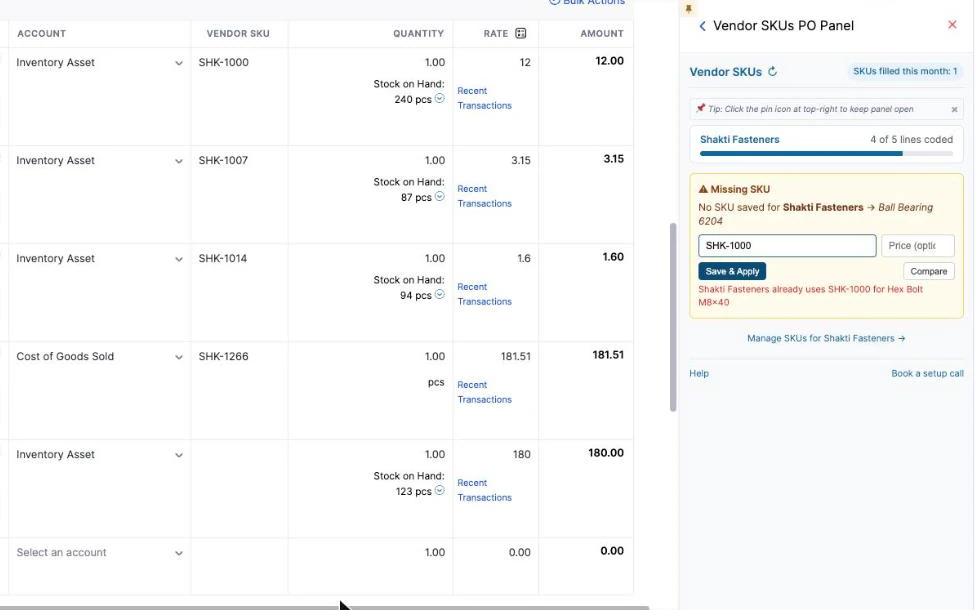
Add a missing SKU from the PO
Add a SKU from the PO side panel without leaving the order. The app blocks a SKU that the same vendor already uses for another item.
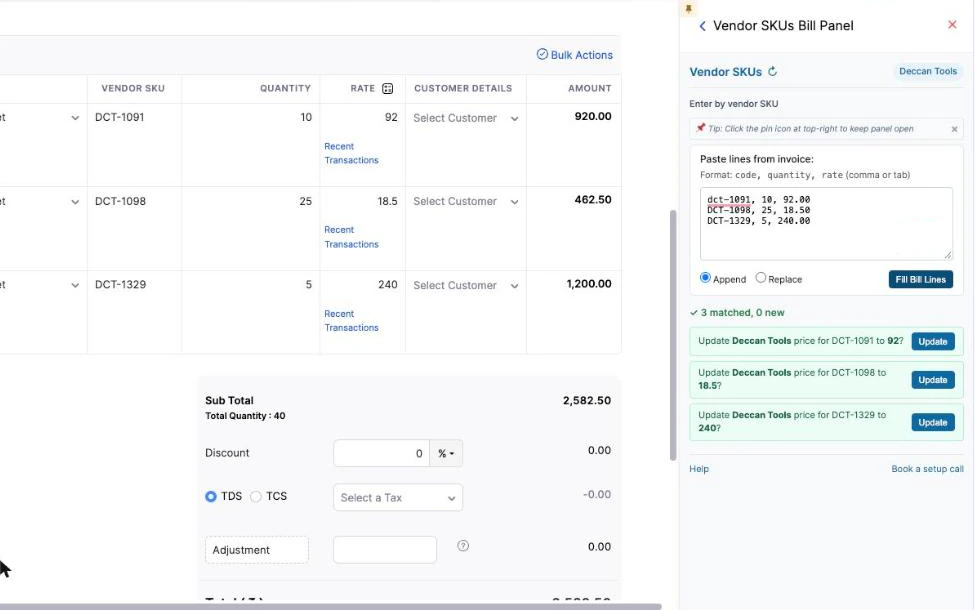
Match vendor bills by SKU
Paste the lines from a vendor's bill. The app finds your items by the vendor's SKU, in upper or lower case, and fills the bill lines.

Spot a price change
A card shows when a vendor's price differs from what you paid before.
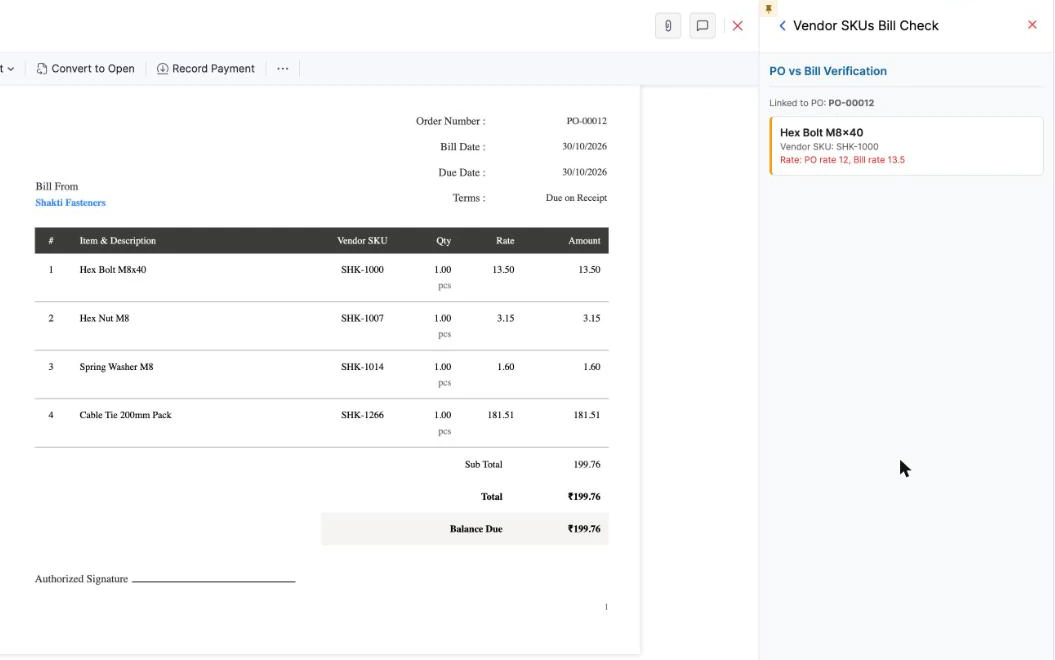
Check a bill against its PO
On a saved bill, the Bill Check side panel checks the bill against its purchase order.
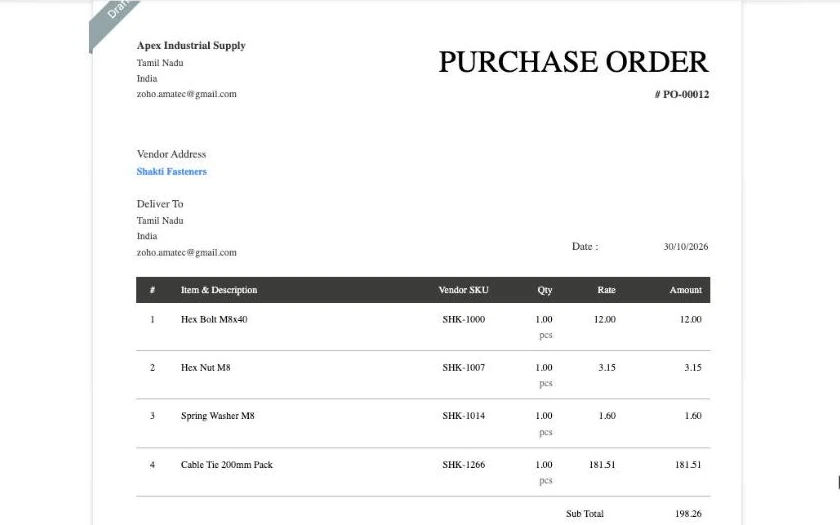
Vendor SKU on the PO PDF
The vendor's SKU prints on the purchase order you send, so the vendor recognises every line.
- Minimum order warning Warns when a PO line is below the vendor's minimum order quantity.
- Search, Bulk Import and Export Find any SKU, load many at once from a CSV file, and export them all.
- Usage counter Shows how many SKUs the app filled this month.

Buying with and without Multi Vendor SKU
| Task | Without the app | With Multi Vendor SKU |
|---|---|---|
| Vendor codes on a PO | Looked up in a spreadsheet and typed on each line | Filled on each line when you pick the vendor |
| Changing the vendor on a PO | Every code retyped for the new vendor | The SKUs switch to the new vendor's codes |
| Matching a vendor's bill | Each line matched to an item by eye | Paste the bill lines and the app finds your items by vendor SKU |
| Where vendor codes are kept | A spreadsheet outside Zoho | A Vendor SKUs module in your own Zoho Inventory account |
| Getting the right item | The vendor reads your item code and has to work out which of theirs you mean | The vendor's own SKU prints on the PO PDF, so they recognise every line |
Watch Multi Vendor SKU in Zoho Inventory
A short demo video is on the way. Until then, the steps above show each screen.
How Multi Vendor SKU works inside Zoho Inventory
The parts of the app, in the order you meet them. Each one runs inside your Zoho Inventory account.
-
01
Install from Zoho Marketplace
You install Multi Vendor SKU in Zoho Inventory from Zoho Marketplace.
-
02
Vendor SKUs tab
The app's own tab in Zoho Inventory. Run the guided setup here, work through My SKU list, and search, import or export your SKUs.
-
03
Vendor SKUs module
Every SKU you save is a record in a custom module called Vendor SKUs, inside your own Zoho Inventory account.
-
04
Vendor SKU item field
A custom item field called Vendor SKU, also stored in your Zoho Inventory account.
-
05
Purchase order side panel
Pick a vendor on a purchase order and each line gets that vendor's SKU. Add a missing SKU from the side panel. The app warns when a line is below the vendor's minimum order quantity.
-
06
Bill side panel
Paste the lines from the vendor's bill. The app finds your items by vendor SKU and fills the bill lines. A price change card shows when a price differs from what you paid before.
-
07
Bill Check panel
On a saved bill, the Bill Check panel checks the bill against its purchase order.
Questions, answered
It is a Zoho Inventory extension that stores the SKU each vendor uses for your items. It fills those SKUs on purchase orders and bills, and matches vendor bills back to your items by the vendor's SKU. You install it from Zoho Marketplace.
Yes. Save a separate SKU for every vendor you buy the item from. Your "Hex Bolt M8x40" can be "SHK-1000" at one vendor and "BB-77" at another, and each purchase order shows the code for the vendor on that order.
No. Vendor SKUs are stored separately, in a custom module called Vendor SKUs and a custom item field called Vendor SKU. The SKU field on your item stays as it is.
Export Vendors and Bills from Zoho Inventory as CSV files and drop both into setup. The app lists every item you have bought from each vendor, with how often you bought it and the last price. Type each vendor's SKU and click Save SKUs. To load many at once, use Bulk Import with a CSV file.
Yes. Paste the lines from a vendor's bill and the app finds your items by the vendor's SKU, in upper or lower case, and fills the bill lines. On a saved bill, the Bill Check panel checks the bill against its purchase order.
It works with any Zoho Inventory edition in any Zoho data centre. You install it from Zoho Marketplace, and the interface is in English. A Zoho Books version is planned.
Multi Vendor SKU costs $29 per organization per month, with a 30 day free trial. For help, email hello@amatec.in. Amatec built the app and gives support directly.
Stop typing vendor codes by hand
Book a demo to see Multi Vendor SKU in Zoho Inventory, or talk to the team that built it about your purchasing process in Zoho.